
When you open a Wise account through our link, Resort Leaders may receive a small referral fee. It's important to remember this is not financial advice. Always do your own research before choosing financial products, and Resort Leaders assume no liability for your arrangements with third parties.
How to set up your Wise USD balance
Getting paid in America is easy with Wise. Follow these simple steps to create your account:
1. Register for a Wise account
Follow the link in your perks section to create a new Wise account
Enter your email address
Choose Personal Account
Select your country and choose a password to create your account
Wise availability depends on your country of residence and may not be available in all locations. Please check with Wise directly to confirm if their services are supported in your country.
2. Get verified
Wise will require you to verify your identity with your ID to comply with financial regulations
You'll be prompted with the required information or documentation needed for verification
You might be asked for additional details or documents during the verification process
3. Add money and open a USD balance
Click "New" then "Open a balance"
Search for and select "United States Dollar"
Click on "Get account details" for your USD balance
You'll need to make an initial deposit of approximately £20 (or equivalent in another currency)
Add money using your bank account, Apple Pay, credit or debit card
Once your account is funded and verified, you'll be able to access your complete US banking details
Navigate to your USD balance and tap "Account details" to view your account and routing numbers
4. Share your details with your resort
Provide your US account details to your resort when completing payroll paperwork to request payment by direct deposit
Your payments will be deposited directly into your Wise account
How to make payments to Resort Leaders with your Wise account
To make your payment you will need your Wise USD balance account number and routing number. To find these account details:
Open the Wise app or website
Navigate to your USD balance
Click on your account number to view your account details
Find your account number and routing number
How to send your payment:
Please note: US bank account payments can take 5-7 business days to process, so don't worry if the payment doesn't appear in your Resort Leaders payment section right away. It will show in the 'Pending Transaction' section until the payment clears and your balance owed updates.
⚠️ Important: Do not search for "Wise" in the bank list.
Stripe's search will show you "Wisely" — this is a different company and will not work. Scroll past the bank logos and tap "Enter bank details manually" instead.
Log in to your Resort Leaders profile and navigate to the payment section
Make sure you are on the 'On Program Payments' tab
Click 'Make a Payment' and enter the amount you wish to pay then click 'Next'
Enter your email address and name
Scroll past the bank list and click 'Enter bank details manually' — do not select "Wisely," this is not the same as Wise.
Enter your Wise USD balance account details: Routing number, Account number and Confirm account number.
You may be asked if you want to save your details with an email address and phone number (you can choose to save or skip)
Review and confirm your payment
You will receive an email from Stripe confirming a direct debit authorization for Smaller Earth USA.
Wise bank account verification
Stripe needs to verify your account before your payment can be completed. Here is what to expect:
Step 1 — Wait for the micro deposit (1–3 working days)
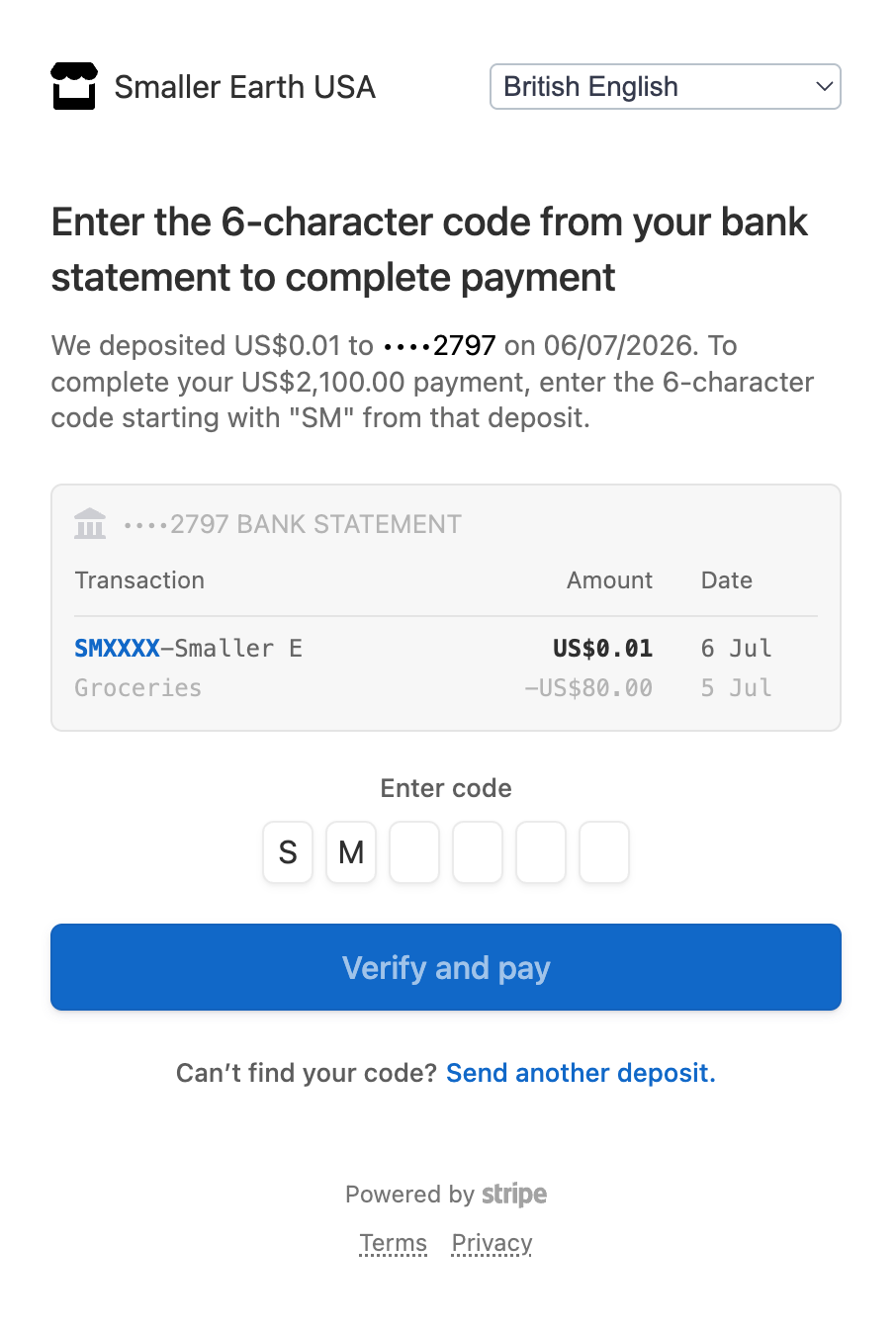
Stripe will send a small test deposit of $0.01 to your bank account. This can take between 1 and 3 working days to appear. You cannot complete your payment until this deposit arrives — this wait is normal, so do not attempt to pay again in the meantime.
Step 2 — Wait for your email from Stripe
Once the micro deposit has been made (1–3 working days), Stripe will send you an email with the subject line: "Verify your bank account for Smaller Earth USA". There is nothing you need to do until this email arrives.
Step 3 — Enter the verification code
Follow the instructions in the email and enter the six-digit code from the deposit transaction.
Step 4 — Make your payment
Once your account is verified, your payment to Resort Leaders will proceed as normal.
Stripe is a trusted global payment processor used by businesses worldwide. Your payment information is kept secure throughout this process.